Business Address Verification
Last updated: July 9, 2025
Overview
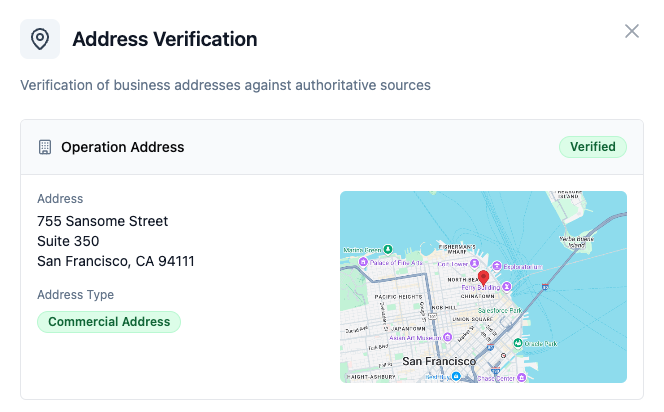
This check verifies the legitimacy of business addresses and validates them against self-attested data to ensure they represent actual physical business locations. It identifies whether an address is a genuine operational location or potentially problematic address types such as registered agents, virtual offices, or residential addresses.
This check analyzes business addresses as part of your KYB (Know Your Business) due diligence process. This check helps you verify address legitimacy and identify potential risks, supporting your AML and compliance requirements.
What This Check Does
This check performs comprehensive address verification to verify:
Physical legitimacy of business addresses using Google Maps validation
Address type classification (business, residential, PO box, registered agent, virtual office)
Cross-referencing against known registered agent databases
Web search analysis to identify non-physical business locations
Validation against self-attested address information
Risk assessment based on address characteristics and verification results
How to Add This Check
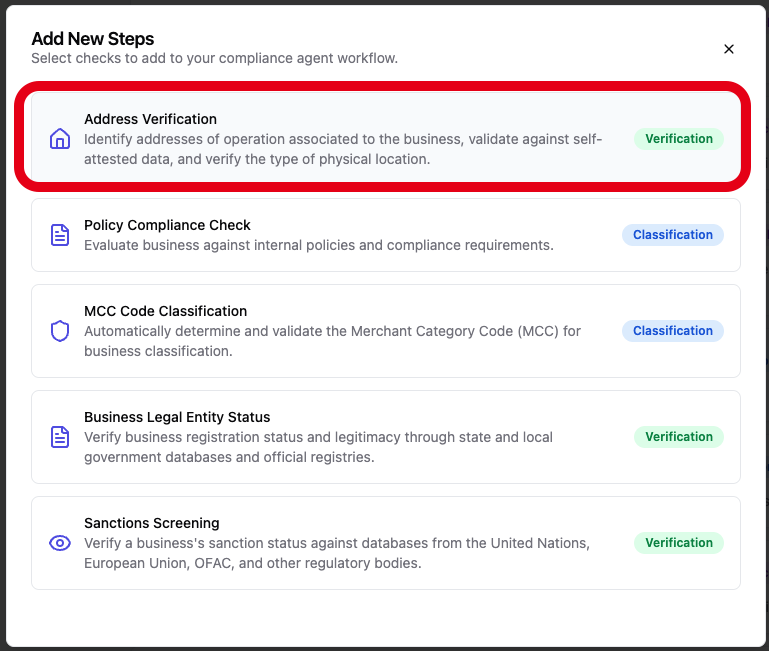
Navigate to your compliance agent configuration page
Click "Add another step" at the bottom of your verification workflow
Find "Address Verification" in the available KYB checks
Click to add it to your due diligence process
[Screenshot placeholder: Adding Address Verification check to compliance agent]
Required Information
Before running this check, ensure your KYB case includes:
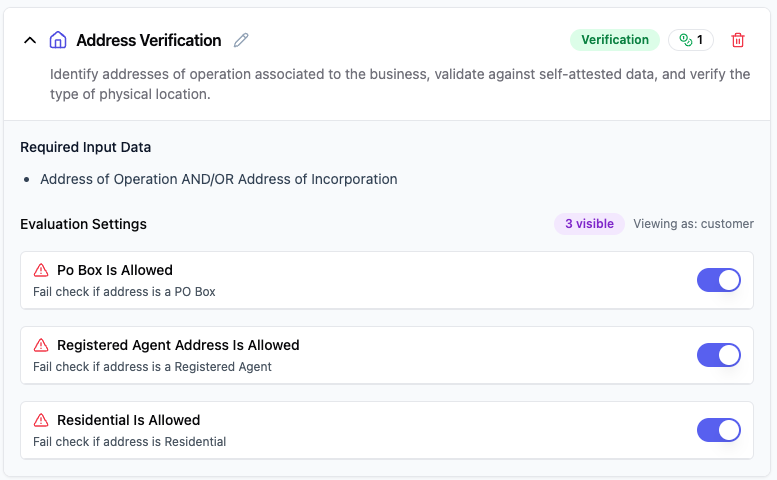
Address of Operation AND/OR Address of Incorporation
Business Name OR Registered Business Name
Configuration Options
Basic Configuration
This check runs automatically with default settings, but you can customize several parameters to adjust the verification strictness and scope.
Address Type Restrictions
Allow PO Box Addresses: Controls whether PO box addresses are accepted as valid business locations
Allow (default): PO box addresses will pass verification but be flagged as PO box type
Restrict: PO box addresses will cause the check to fail
Allow Registered Agent Addresses: Controls whether known registered agent addresses are accepted
Allow (default): Registered agent addresses will pass verification but be flagged as registered agent type
Restrict: Registered agent addresses will cause the check to fail
Allow Residential Addresses: Controls whether residential addresses are accepted for business operations
Allow (default): Residential addresses will pass verification but be flagged as residential type
Restrict: Residential addresses will cause the check to fail
Verification Scope Configuration
Search Results Limit: Maximum number of web search results to analyze for address verification (default: 20, range: 5-50)
Keyword Search Limit: Maximum number of results per targeted keyword search (default: 5, range: 1-10)
Web Scraping Timeout: Timeout in seconds for web scraping operations during verification (default: 60, range: 10-300)
[Screenshot placeholder: Address Verification configuration panel showing address type restrictions]
Advanced Options
Enhanced Web Analysis: Enables deeper web scraping and analysis of search results (may increase processing time)
Registered Agent Database: Leverages comprehensive registered agent databases for enhanced detection (recommended for high-risk industries)
[Screenshot placeholder: Advanced configuration options panel]
Understanding Your Results
Check Status
✅ Passed: The address is verified as a legitimate physical business location with no concerning characteristics
⚠ Review: The address was verified but has characteristics that require attention (e.g., PO box, residential, or registered agent)
❌ Failed: The address could not be verified, is not a physical location, or violates configured restrictions
Information Retrieved
When the check completes, you'll see:

Address Verification Results
Address validation status from Google Maps
Physical address components and formatting
Address type classification (business, residential, PO box, etc.)
Match status against self-attested information
Geographic verification and location mapping
[Screenshot placeholder: Address Verification results panel showing verification results]
Address Type Analysis
The results panel shows:
Address Type: Classification of the address (Commercial, Residential, PO Box, Registered Agent, Virtual Office)
Verification Status: Whether the address was successfully verified through authoritative sources
Risk Indicators: Specific flags for potentially problematic address types
Web Search Evidence: Citations from web searches supporting the address classification
[Screenshot placeholder: Address type analysis section in results panel]
Common Issues and Solutions
❌ "Address is a PO Box, which is not a valid physical business location"
Cause: The provided address is identified as a PO Box, and your configuration restricts PO Box addresses
Solutions:
Obtain the actual physical business address from the customer
If PO Box is acceptable for your risk profile, adjust configuration to allow PO Box addresses
Request additional address documentation to verify the physical location
Consider this as a risk factor requiring enhanced due diligence
⚠ "Address appears to be a registered agent address"
Cause: The address matches known registered agent services, suggesting it's not the actual business operational location
Solutions:
Request the actual business operational address from the customer
Verify if the business operates from the registered agent location
Consider this as a risk indicator requiring additional verification
Document the distinction between registered and operational addresses
❌ "Address validation failed - address not found in verification databases"
Cause: The address cannot be verified through Google Maps or other authoritative sources
Solutions:
Verify the address format and spelling with the customer
Check if the address is newly established or in a rural area
Request proof of address documentation
Consider manual verification or additional documentation requirements
Best Practices for Compliance Teams
Address Collection Standards
Always collect both operational and incorporation addresses when available
Verify address format and completeness before processing
Document the source and date of address information
Risk Assessment Guidelines
PO Box addresses indicate higher risk requiring enhanced due diligence
Registered agent addresses suggest separation between legal and operational locations
Residential addresses may indicate home-based businesses requiring additional verification
Documentation Requirements
Maintain records of address verification results and methodology
Document any discrepancies between self-attested and verified addresses
Create audit trails for address-related compliance decisions
Regulatory Compliance Context
This check supports your compliance obligations for:
AML (Anti-Money Laundering): Address verification is a key component of KYB compliance under the Financial Action Task Force (FATF) recommendations and helps prevent businesses from facilitating financial crimes such as money laundering and terrorist financing.
KYB (Know Your Business): Address verification measures are legally required by FATF, regional regulations such as the 5th and 6th EU AML directives, and various national AML laws. The Customer Due Diligence (CDD) rule by FinCEN obligates financial institutions to identify and verify business information including addresses.
Customer Due Diligence: Address verification helps authenticate business legitimacy and location, supporting the standard KYB process of collecting basic identifying information such as company address and registration documents.
Enhanced Due Diligence: For high-risk businesses or those with non-standard address types, enhanced address verification provides additional scrutiny required by regulatory authorities.
Regulatory References
Financial Action Task Force (FATF) recommendations on KYB verification requirements
FinCEN Customer Due Diligence (CDD) rule requiring business address verification
EU 5th and 6th Anti-Money Laundering Directives (AMLDs) setting KYB requirements
The USA PATRIOT Act establishing foundational KYC and KYB requirements
Bank Secrecy Act (BSA) requirements for customer identification and verification
International Compliance
FATF global standards for address verification in KYB compliance
Regional AML directives requiring business address authentication
Cross-border compliance considerations for multinational businesses
[Screenshot placeholder: Compliance documentation and audit trail features]
Technical Details
Check ID: kyb.self_attested_address_check_tool Check Family: Verification Typical Processing Time: 30-120 seconds Data Sources: Google Maps API, Registered Agent Databases, Web Search Results, Address Validation Services
Need Help?
If you're experiencing issues with this check:
Review the troubleshooting section above
Check our Common Issues Guide
Contact our support team with your specific case details - we're here to help!
Last updated: 2025-01-09 Related checks: Business Profile Verification, Incorporation Document Verification