Business Adverse Media Screening
Last updated: July 9, 2025
Overview
This check analyzes news articles, media coverage, and public information to identify businesses with potential involvement in illegal activities, financial crimes, or other adverse events. The Adverse Media Screening check helps compliance teams identify reputational and operational risks that may not be captured through traditional sanctions or watchlist screening.
This check reviews global media sources, regulatory publications, and law enforcement press releases as part of your KYB (Know Your Business) due diligence process. This check helps you identify businesses with negative media coverage that could indicate higher risk profiles, supporting your AML and compliance requirements.
What This Check Does
This check searches across multiple media sources to verify:
News articles and reports about the business involving criminal activity or misconduct
Regulatory actions, investigations, or enforcement proceedings against the business
Financial crime allegations including fraud, money laundering, bribery, or corruption
Legal proceedings, lawsuits, or criminal charges involving the business
Sanctions violations, compliance failures, or regulatory violations
Overall compliance with adverse media screening requirements under BSA/AML regulations
How to Add This Check
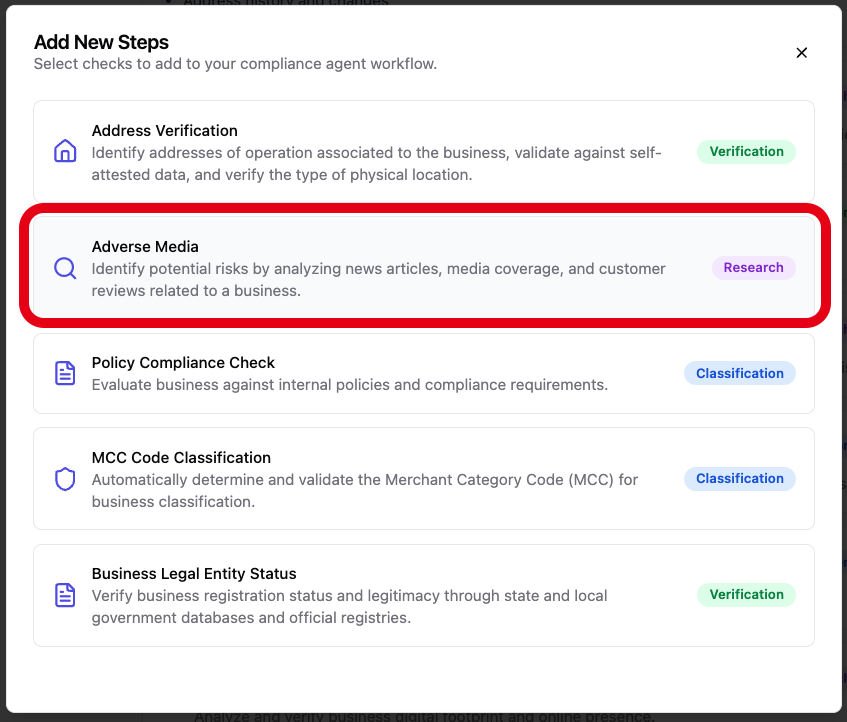
Navigate to your compliance agent configuration page
Click "Add another step" at the bottom of your verification workflow
Find "Adverse Media" in the available KYB checks
Click to add it to your due diligence process
Required Information
Before running this check, ensure your KYB case includes:
Business Name AND/OR Registered Business Name
Website OR Address of Operation OR Address of Incorporation
[Screenshot placeholder: Required information fields for Adverse Media screening]
Configuration Options
Basic Configuration
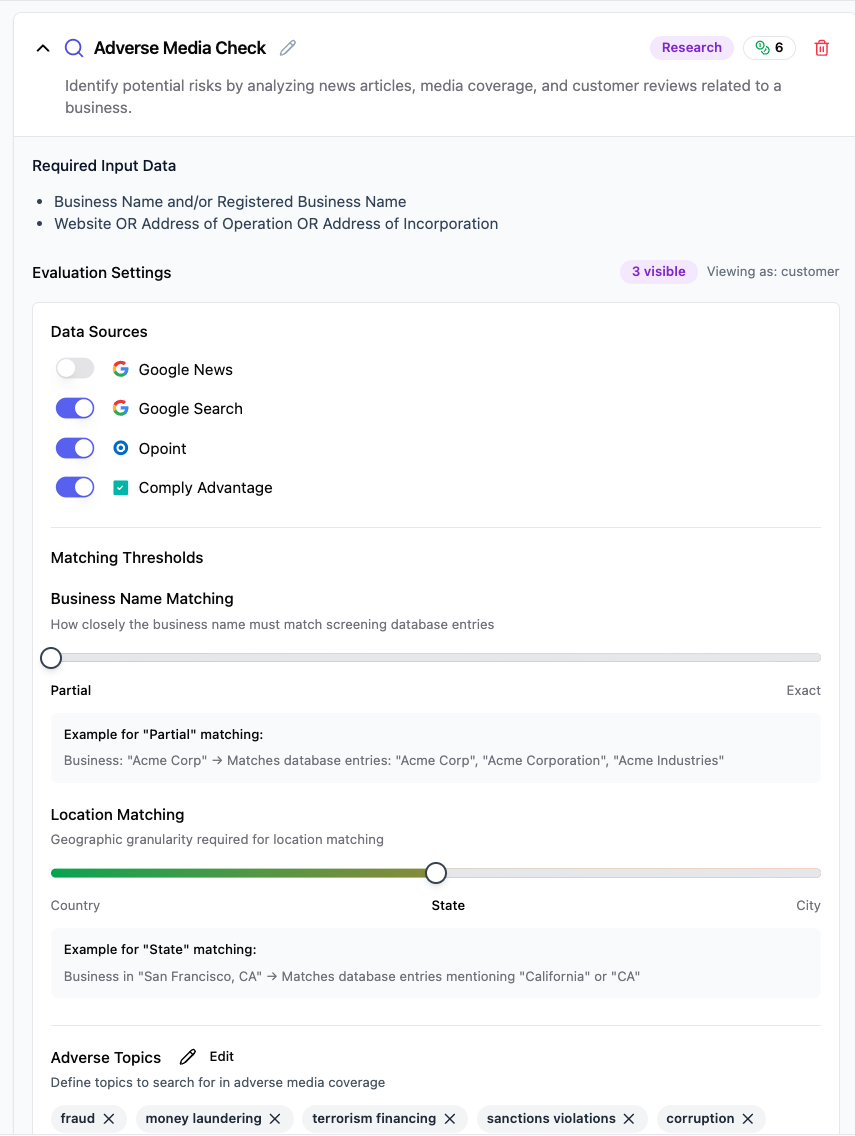
This check runs automatically with default settings, but you can customize several parameters to adjust the analysis depth and matching precision.
Name Matching Configuration
Business Name Matching Threshold: Controls how closely the business name must match adverse media mentions
Exact: Only matches exact business name spellings (higher precision, fewer false positives)
Partial (recommended): Matches partial business names and common variations (balanced approach for comprehensive coverage)
Location Matching Configuration
Location Matching Threshold: Sets the geographic granularity required for location matching
Country: Matches businesses in the same country (broadest geographic matching)
State (recommended): Matches businesses in the same state/province (balanced geographic precision)
City: Matches businesses in the same city (highest geographic precision)
Filtering Options
Filter Non-Perpetrators: Whether to exclude profiles where the business is not the primary subject of adverse media
When enabled, focuses results on businesses that are directly accused or involved in adverse events
When disabled, includes businesses mentioned in adverse media regardless of their role
Understanding Your Results
Check Status
✅ No Matches: No adverse media matches found, or only weak matches that don't meet risk thresholds
⚠ Partial Matches: Partial matches found that require compliance team evaluation
❌ Strong Matches: Strong matches found indicating significant adverse media exposure requiring investigation
Information Retrieved
When the check completes, you'll see:
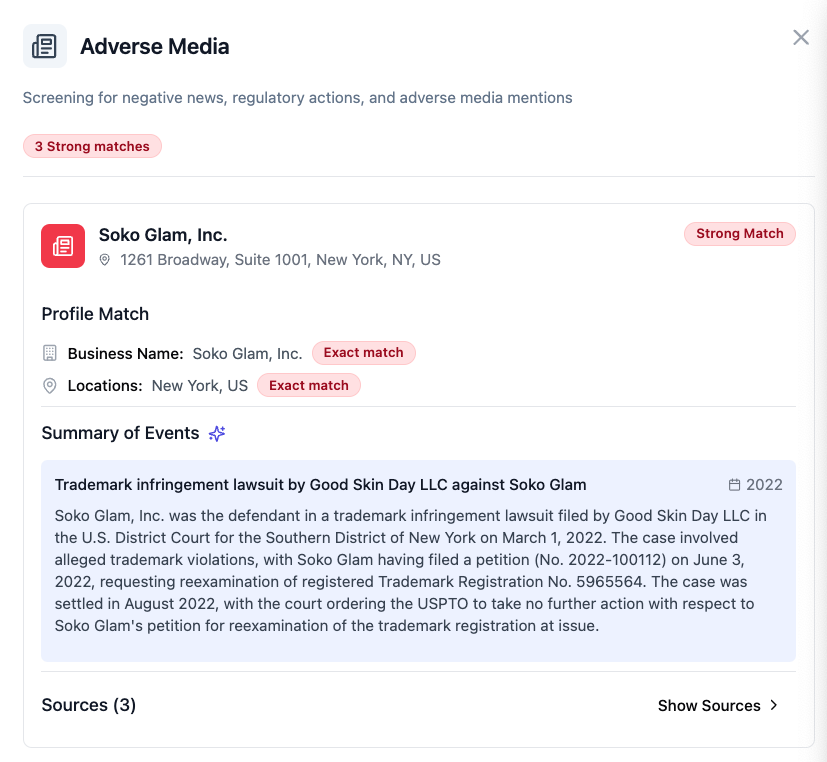
Match Analysis Results
Number of adverse media profiles analyzed
Match strength classification (strong, partial, weak, or no match)
Business name matching confidence and reasoning
Location matching details and geographic overlap
Match rating based on configured thresholds
Adverse Media Profile Details
The results panel shows:
Business Name Variations: Different name spellings found in adverse media
Summary of Events: Description of adverse events or allegations
Publication Dates: When adverse media was published
Geographic Information: Countries, states, or cities mentioned in adverse media
Source URLs: Links to original media sources for verification
Topics: Categories of adverse media (fraud, sanctions, corruption, etc.)
Common Issues and Solutions
❌ "No adverse media profiles found"
Cause: The business name may not appear in media sources, or search parameters are too restrictive
Solutions:
Verify the business name spelling matches publicly available information
Try using both registered business name and doing-business-as (DBA) names
Adjust business name matching threshold to "Partial" for broader coverage
Check if the business operates under different names or has subsidiaries
⚠ "Multiple weak matches found"
Cause: Common business names or locations may generate false positives
Solutions:
Review location matching threshold - increase to "State" or "City" for better precision
Enable "Filter Non-Perpetrators" to focus on businesses directly involved in adverse events
Manually review match details to determine if matches are relevant to your specific business
Document decision rationale for compliance audit trails
❌ "Strong match found but appears to be false positive"
Cause: Different businesses with similar names and locations may be incorrectly matched
Solutions:
Review business registration details and compare with adverse media details
Check incorporation dates - adverse media predating business formation may indicate false positive
Verify business address details match those mentioned in adverse media
Consider requesting additional business documentation for clarification
Document investigation findings and maintain evidence of due diligence
Best Practices for Compliance Teams
Data Collection Standards
Maintain accurate business name variations including legal names, DBA names, and trade names
Collect comprehensive address information including all business locations
Document business ownership structure to identify related entities
Risk Assessment Guidelines
Strong matches require immediate enhanced due diligence and senior management approval
Partial matches should trigger additional verification steps and ongoing monitoring
Consider the recency of adverse media - recent events may pose higher immediate risk
Evaluate the credibility of media sources and verify through multiple sources when possible
Documentation Requirements
Maintain records of all adverse media screening results and decisions
Document rationale for accepting customers with adverse media exposure
Keep copies of source media articles and verification evidence
Record any enhanced due diligence measures implemented
Regulatory Compliance Context
This check supports your compliance obligations for:
AML (Anti-Money Laundering): The Bank Secrecy Act (BSA) and FinCEN regulations require financial institutions to implement risk-based customer due diligence programs. Adverse media screening helps identify high-risk customers that may require enhanced monitoring, supporting BSA compliance by detecting customers involved in suspicious activities or financial crimes.
KYB (Know Your Business): Customer Due Diligence requirements under BSA mandate that financial institutions understand the nature and purpose of customer relationships. Adverse media screening provides critical context about business reputation and potential risks, supporting comprehensive KYB programs required by FinCEN.
Customer Due Diligence: FinCEN's Customer Due Diligence Requirements (31 CFR 1010.230) mandate ongoing monitoring of customer relationships. Adverse media screening supports this requirement by identifying customers with negative media coverage that may indicate higher risk profiles requiring additional scrutiny.
Enhanced Due Diligence: The FATF recommendations and US AML regulations require enhanced due diligence for higher-risk customers. Adverse media findings often trigger EDD requirements, making this screening essential for risk-based compliance programs.
Regulatory References
Bank Secrecy Act (BSA): Requires financial institutions to establish AML programs including customer due diligence with adverse media screening as a key component
FinCEN Customer Due Diligence Requirements (31 CFR 1010.230): Mandates ongoing monitoring of customer relationships, including adverse media screening
FATF Recommendations: Guidance specifies "verifiable adverse media searches" as a factor in customer risk assessments and enhanced due diligence processes
USA PATRIOT Act Section 312: Requires enhanced due diligence for correspondent accounts and private banking, often triggered by adverse media findings
FFIEC BSA/AML Examination Manual: Provides guidance on risk-based customer due diligence including adverse media screening requirements
International Compliance
FATF Guidance: The Financial Action Task Force includes adverse media screening in its anti-money laundering guidelines as part of risk-based compliance approaches
6th Anti-Money Laundering Directive (6AMLD): EU regulation recognizing adverse media screening as essential for identifying higher-risk customers
UK Proceeds of Crime Act: Requires adverse media screening as part of enhanced due diligence for suspicious customer relationships
[Screenshot placeholder: Compliance documentation and audit trail features]
Technical Details
Check ID: kyb.adverse_media_screening_check_v2 Check Family: Research Typical Processing Time: 2-5 minutes Data Sources: Global media databases, news aggregators, regulatory publications, law enforcement press releases
Need Help?
If you're experiencing issues with this check:
Review the troubleshooting section above
Check our Common Issues Guide
Contact our support team with your specific case details - we're here to help!
Last updated: 2025-01-09 Related checks: Sanctions Screening, Business Ownership Verification