Individual Adverse Media Screening Check
Last updated: September 11, 2025
Overview
This check systematically screens individuals against adverse media sources to identify negative news mentions that could indicate potential financial crimes, regulatory violations, or other risks requiring enhanced due diligence. It searches across multiple languages and media sources to detect unfavorable information about individuals in news reports, blogs, court filings, and other public databases.
This check analyzes adverse media profiles as part of your KYC (Know Your Customer) due diligence process. This check helps you identify potential risks associated with individuals by detecting negative news coverage, supporting your AML and compliance requirements under BSA, USA PATRIOT Act, and FinCEN regulations.
What This Check Does
This check performs comprehensive adverse media screening to verify:
Individual identity matching against adverse media profiles using configurable name, age, and location thresholds
Adverse media events including criminal allegations, fraud investigations, sanctions violations, and regulatory breaches
Risk assessment based on match strength ratings (strong, partial, weak, or no match)
Event context analysis examining the individual's role in adverse media events (perpetrator status, deceased status, etc.)
Comprehensive coverage across multiple languages and global media sources for thorough risk identification
How to Add This Check
Navigate to your compliance agent configuration page
Click "Add another step" at the bottom of your verification workflow
Find "Individual Adverse Media Screening" in the available KYC checks
Click to add it to your due diligence process
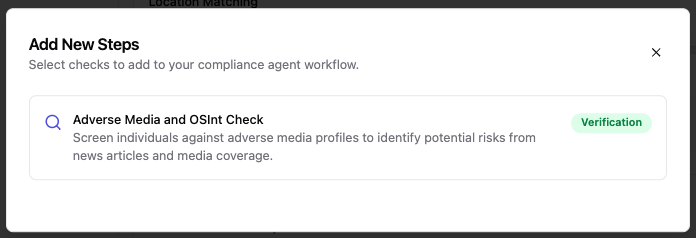
Required Information
Before running this check, ensure your KYC case includes:
First Name AND Last Name (required for identity matching)
Date of Birth OR Age (strongly recommended for accurate matching)
Country of Residence AND/OR Country of Nationality (enhances geographic matching accuracy)
Associated Addresses (optional, enhances location-based matching when enabled)
Screenshot placeholder: Required information fields for Individual Adverse Media Screening
Configuration Options
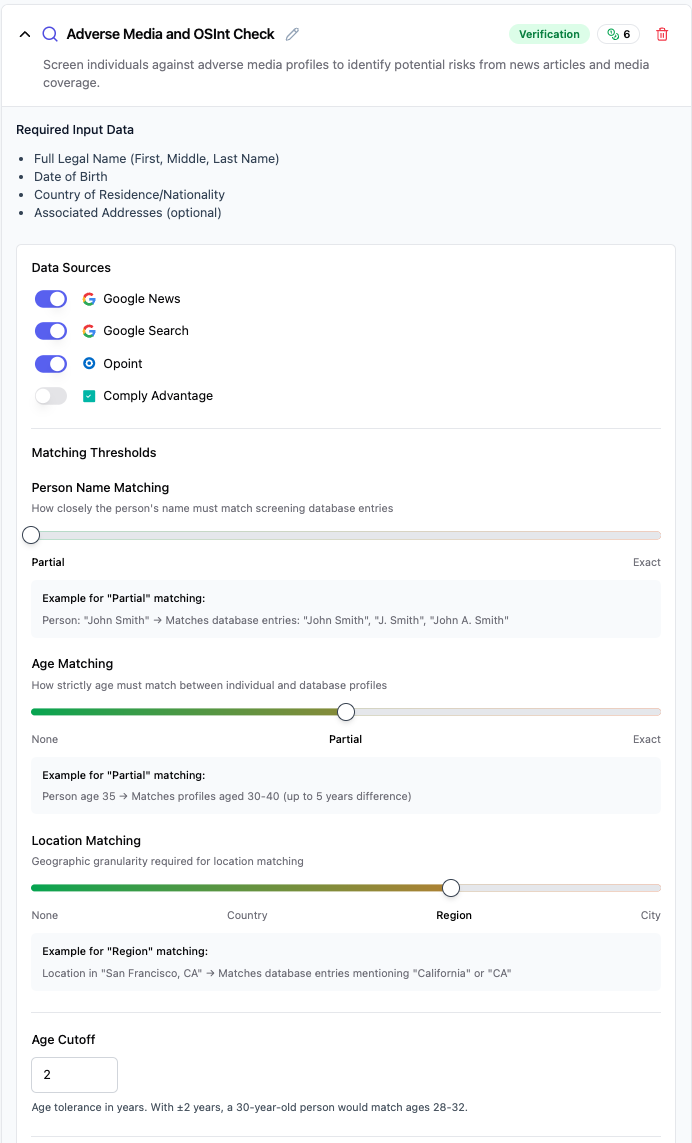
Basic Configuration
This check runs automatically with default settings, but you can customize several parameters to adjust the analysis depth and matching sensitivity.
Identity Matching Thresholds
Name Matching Threshold: Controls how closely the individual's name must match adverse media mentions
Partial (recommended): Allows for variations in spelling, nicknames, and partial matches while maintaining reasonable precision
Exact: Requires exact name matches only - use when you need maximum precision but may miss valid matches due to spelling variations
Age Matching Threshold: Controls how strictly age must match between individual and adverse media profiles
Flexible: Allows broader age ranges for matching - useful when birth dates are uncertain or when screening older individuals
Moderate (recommended): Balances accuracy with coverage by allowing reasonable age tolerance
Strict: Requires very close age matching - use when you have precise birth date information and need maximum accuracy
Location Matching Threshold: Controls geographic precision required for location matching
None: Disables location matching entirely - use when geographic data is unreliable
Country: Matches at country level - broadest geographic scope for international screening
Region (recommended): Matches at regional/state level - good balance of precision and coverage
City: Requires precise location matching - use when you need maximum geographic accuracy
Risk Assessment Configuration
Match Ratings for DENY Recommendation: Select which match ratings result in automatic denial
Strong Match (default - high confidence matches requiring immediate attention)
Match Ratings for REVIEW Recommendation: Select which match ratings trigger manual review
Partial Match (default - moderate confidence matches requiring analyst review)
Data Processing Options
Remove Deceased Individuals: Automatically filter out profiles of deceased individuals (default: disabled)
Filter Non-Perpetrators: Remove profiles where the individual is not the primary perpetrator of adverse events (default: enabled)
Remove No Clusters Found: Exclude profiles with no identifiable event clusters (default: disabled)
Enable Analysis: Run AI-powered analysis and summarization of results (default: enabled)
Advanced Options
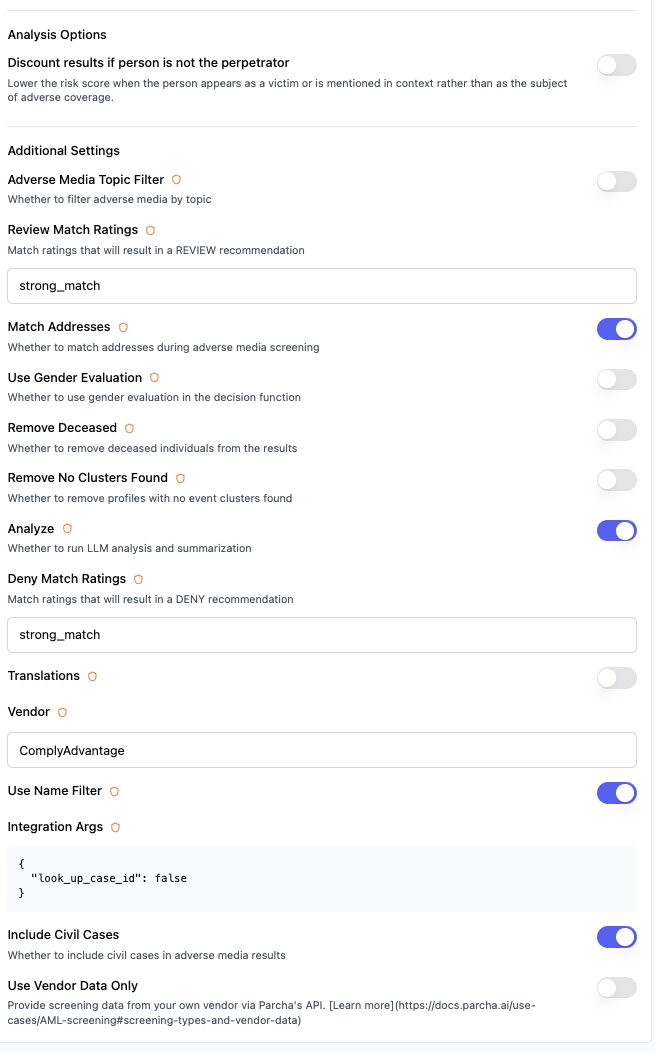
Enhanced Address Matching: Enable comprehensive address comparison during screening (default: disabled, may increase processing time)
Gender Evaluation: Include gender-based matching criteria in the decision matrix (default: disabled, recommended for high-precision screening)
Adverse Media Topic Filter: Apply topic-based filtering to adverse media results (default: disabled)
Scraper Processing Order: Configure the order of web scrapers for processing adverse media links (BROWSERBASE, SCRAPINGBEE)
Understanding Your Results
Check Status
✅ Passed: No adverse media matches found, or only weak/no matches that don't trigger risk thresholds
⚠ Review: Partial matches identified that require manual review to determine if they represent genuine risks
❌ Failed: Strong matches found indicating high likelihood of adverse media association requiring immediate attention
Information Retrieved
When the check completes, you'll see:
Profile Match Information
Customer name and demographic details used for matching
Total number of adverse media profiles analyzed
Match strength distribution (strong, partial, weak, no match)
Overall risk recommendation based on configured thresholds
Age and location matching details for each profile
Screenshot placeholder: Individual Adverse Media Screening results panel showing profile match information
Adverse Media Event Details
The results panel shows:
Event Summaries: Description of adverse media events and the individual's alleged involvement
Source Information: News articles, court filings, and other media sources with publication dates and domains
Topics and Categories: Type of adverse media (financial crimes, sanctions, fraud, etc.)
Geographic Context: Countries and locations associated with the adverse media events
Timeline Information: When events occurred and when they were reported
Screenshot placeholder: Adverse media event details section in results panel
Common Issues and Solutions
❌ "No adverse media profiles found for analysis"
Cause: The individual's name does not match any profiles in the adverse media database, or the name matching threshold is too strict.
Solutions:
Verify the individual's name is spelled correctly and complete
Consider adjusting the name matching threshold to "Partial" if currently set to "Exact"
Check if alternative spellings or known aliases should be included in the search
This result may indicate genuinely clean adverse media history - no further action needed
⚠ "Partial matches require manual review"
Cause: The system found potential matches but cannot determine with high confidence whether they represent the same individual.
Solutions:
Review the detailed match information including age, location, and event context
Compare profile demographics with known customer information
Consider the severity and relevance of the adverse media events
Document your review decision and rationale for audit purposes
❌ "Strong matches found - enhanced due diligence required"
Cause: High-confidence matches indicate likely adverse media association requiring immediate attention.
Solutions:
Immediately escalate to compliance team for enhanced due diligence procedures
Review all associated adverse media events and their current status
Determine if regulatory reporting (SARs) or customer restrictions are required
Document all findings and decisions for regulatory examination
Best Practices for Compliance Teams
Configuration Standards
Use "Moderate" age matching and "Region" location matching for balanced accuracy
Set name matching to "Partial" unless you have specific reasons for exact matching
Regularly review and adjust thresholds based on false positive rates
Risk Assessment Guidelines
Strong matches require immediate escalation and enhanced due diligence
Partial matches need thorough manual review with documented decision rationale
Consider the recency, severity, and relevance of adverse media events
Factor in the individual's role (perpetrator vs. victim or witness)
Documentation Requirements
Maintain detailed records of all adverse media screening results
Document manual review decisions for partial matches
Keep evidence of enhanced due diligence procedures for strong matches
Ensure audit trail compliance for regulatory examinations
Regulatory Compliance Context
This check supports your compliance obligations for:
AML (Anti-Money Laundering): Adverse media screening is essential for identifying potential money laundering risks and supports BSA compliance by enabling early detection of suspicious individuals. Under the Bank Secrecy Act as amended by the USA PATRIOT Act, financial institutions must adopt customer identification programs that include ongoing monitoring for adverse information.
KYC (Know Your Customer): FinCEN and other regulatory bodies emphasize adverse media screening as a core component of customer due diligence. The risk-based approach mandated by FATF recommendations requires financial institutions to identify negative news as part of ongoing due diligence, particularly for enhanced due diligence scenarios.
Customer Due Diligence: The USA PATRIOT Act Section 312 requires enhanced due diligence for certain high-risk customers, which includes adverse media screening. This check helps fulfill ongoing monitoring requirements by detecting new adverse media mentions about existing customers.
Enhanced Due Diligence: Regulatory guidance from FinCEN, FFIEC, and other agencies emphasizes adverse media screening as an enhanced due diligence technique, particularly for high-risk scenarios involving PEPs, customers from high-risk jurisdictions, or unusual transaction patterns.
Regulatory References
USA PATRIOT Act Section 312: Enhanced due diligence requirements for correspondent accounts and private banking accounts
Bank Secrecy Act (BSA): Customer identification and ongoing monitoring requirements administered by FinCEN
FATF Recommendations: Risk-based approach to AML compliance including adverse media monitoring
FinCEN Guidance: Emphasis on adverse media screening as part of comprehensive AML programs
FFIEC BSA/AML Examination Manual: Guidelines for adverse media screening in customer due diligence
International Compliance
FATF Standards: International standards requiring adverse media screening as part of customer due diligence
EU AML Directives: European requirements for adverse media monitoring in risk-based approaches
Cross-border Compliance: Multi-jurisdictional adverse media screening for international customer relationships
Global Sanctions Compliance: Integration with OFAC and other sanctions screening requirements
Screenshot placeholder: Compliance documentation and audit trail features
Technical Details
Check ID: kyc.adverse_media_screening_check_v2 Check Family: Verification Typical Processing Time: 2-5 minutes depending on profile complexity and analysis depth Data Sources: Multiple global adverse media databases, news sources, public records, and court filings Supported Languages: Multi-language adverse media detection and analysis
Need Help?
If you're experiencing issues with this check:
Review the troubleshooting section above
Contact our support team with your specific case details - support@parcha.ai