PEP Screening Check
Last updated: September 11, 2025
Overview
This check screens individuals against comprehensive Politically Exposed Persons (PEP) databases to identify individuals who hold or have held prominent public positions. This check helps ensure compliance with enhanced due diligence requirements by analyzing individual names, addresses, and political affiliations against global PEP lists.
This check analyzes PEP profile matches to verify individual status for enhanced due diligence requirements, supporting your KYC (Know Your Customer) due diligence process. This check helps you identify politically exposed persons, assess enhanced risk levels, and meet regulatory obligations for PEP screening under AML and KYC regulations.
What This Check Does
This check searches PEP databases to verify:
Individual name matching against global PEP lists using configurable name, age, and location thresholds
Political position verification against current and former public officials, politicians, and government appointees
Family and associate screening for relatives and close associates of PEPs (RCAs)
Risk assessment based on PEP level, position influence, and current status
Enhanced due diligence triggers for comprehensive risk evaluation and ongoing monitoring
How to Add This Check
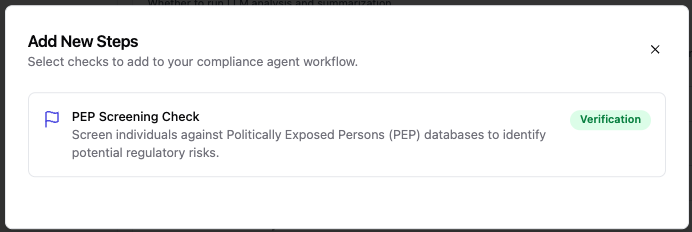
Navigate to your compliance agent configuration page
Click "Add another step" at the bottom of your verification workflow
Find "PEP Screening" in the available KYC checks
Click to add it to your due diligence process
Required Information
Before running this check, ensure your KYC case includes:
First Name AND Last Name (required for identity matching)
Date of Birth OR Age (strongly recommended for accurate matching)
Country of Residence AND/OR Country of Nationality (enhances political position matching accuracy)
Associated Addresses (optional, enhances location-based matching when enabled)
Configuration Options
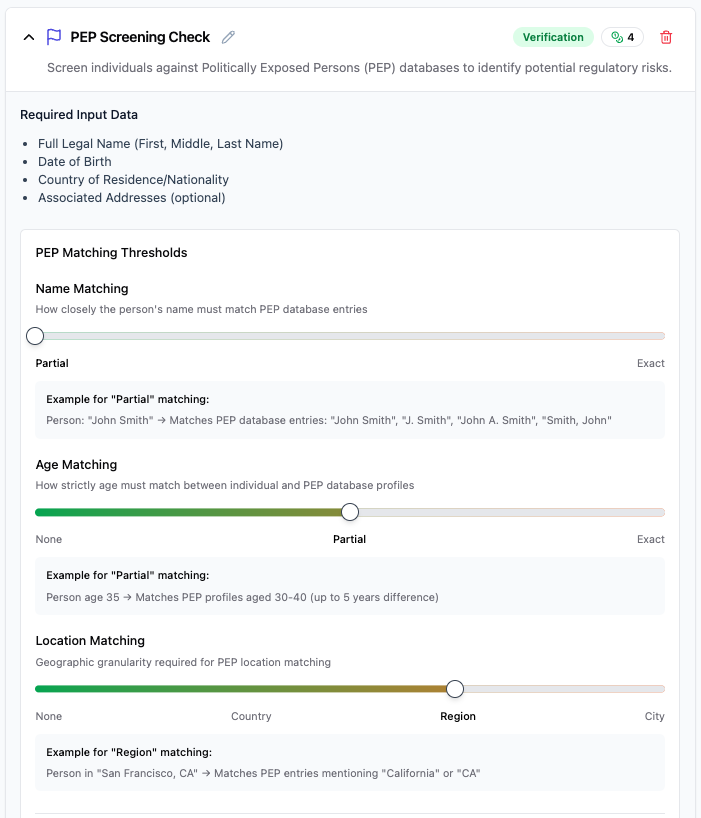
Basic Configuration
This check runs automatically with default settings, but you can customize several parameters to adjust the screening sensitivity and matching criteria.
Identity Matching Thresholds
Name Matching Threshold: Controls how closely the individual's name must match PEP list entries
Partial (recommended): Allows for variations in spelling, nicknames, and partial matches while maintaining reasonable precision
Exact: Requires exact name matches only - use when you need maximum precision but may miss valid matches due to spelling variations
Age Matching Threshold: Controls how strictly age must match between individual and PEP profiles
Flexible: Allows broader age ranges for matching - useful when birth dates are uncertain
Moderate (recommended): Balances accuracy with coverage by allowing reasonable age tolerance
Strict: Requires very close age matching - use when you have precise birth date information and need maximum accuracy
Location Matching Threshold: Controls geographic precision required for location matching
None: Disables location matching entirely - use when geographic data is unreliable
Country: Matches at country level - broadest geographic scope for international PEP screening
Region (recommended): Matches at regional/state level - good balance of precision and coverage
City: Requires precise location matching - use when you need maximum geographic accuracy
Risk Assessment Configuration
Match Ratings for DENY Recommendation: Select which match ratings result in automatic denial
Strong Match (default - high confidence matches requiring immediate attention)
Match Ratings for REVIEW Recommendation: Select which match ratings trigger manual review
Partial Match (default - moderate confidence matches requiring analyst review)
Data Processing Options
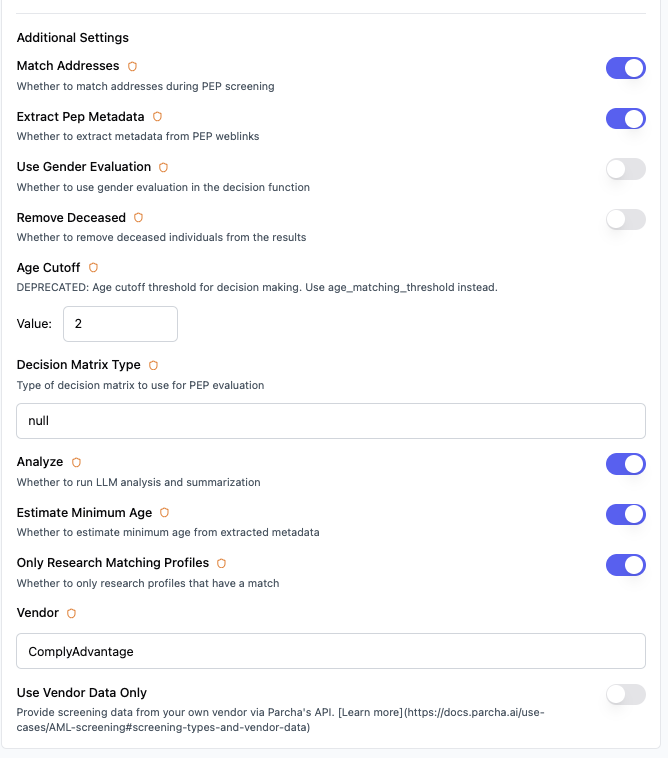
Remove Deceased Individuals: Automatically filter out profiles of deceased PEPs (default: disabled)
Enable Analysis: Run AI-powered analysis and summarization of PEP results (default: enabled)
Extract PEP Metadata: Extract detailed metadata from PEP weblinks for enhanced profiling (default: enabled)
Estimate Minimum Age: Use extracted metadata to estimate minimum age for better matching (default: enabled)
Only Research Matching Profiles: Limit detailed research to profiles that have a match rating (default: enabled)
Advanced Options
Enhanced Address Matching: Enable comprehensive address comparison during screening (default: disabled, may increase processing time)
Gender Evaluation: Include gender-based matching criteria in the decision matrix (default: disabled)
Scraper Processing Order: Configure the order of web scrapers for processing PEP-related links (BROWSERBASE, SCRAPINGBEE)
Understanding Your Results
Check Status
✅ Passed: No PEP matches found, or only weak/no matches that don't trigger risk thresholds
⚠ Review: Partial matches identified requiring enhanced due diligence and manual review
❌ Failed: Strong matches found indicating high likelihood of PEP status requiring immediate enhanced due diligence
Information Retrieved
When the check completes, you'll see:
PEP Match Information
Customer name and demographic details used for matching
Total number of PEP profiles analyzed
Match strength distribution (strong, partial, weak, no match)
Enhanced due diligence recommendation based on configured thresholds
Political position details and influence level for each match
PEP Profile Details
The results panel shows:
Political Positions: Current and former public roles, government positions, and political appointments
Influence Level: Assessment of the PEP's level of influence and risk (local, national, international)
Family and Associates: Information about relatives and close associates (RCAs) when relevant
Geographic Context: Countries and jurisdictions associated with political positions
Timeline Information: Dates of political appointments and current status (active/former PEP)
Source Information: Official government sources, political databases, and public records with publication dates
Common Issues and Solutions
❌ "No PEP profiles found for analysis"
Cause: Individual's name does not match any entries in the PEP databases, or the name matching threshold is too strict.
Solutions:
Verify the individual's name is spelled correctly and complete
Consider adjusting the name matching threshold to "Partial" if currently set to "Exact"
Check if alternative spellings or known aliases should be included in the search
This result may indicate genuinely clean PEP history - no enhanced due diligence required
⚠ "Partial PEP matches require enhanced due diligence"
Cause: The system found potential matches but cannot determine with high confidence whether they represent the same individual.
Solutions:
Review the detailed match information including age, location, and political context
Compare profile demographics with known customer information
Consider the level of influence and current status of the political positions
Implement enhanced due diligence procedures as required by regulation
Document your review decision and rationale for audit purposes
❌ "Strong PEP match - enhanced due diligence required"
Cause: High-confidence matches indicate likely PEP status requiring mandatory enhanced due diligence procedures.
Solutions:
Immediately implement enhanced due diligence procedures as required by regulation
Assess the PEP's level of influence and associated risk factors
Review source of wealth and source of funds documentation
Consider ongoing enhanced monitoring requirements
Document all enhanced due diligence findings and decisions for regulatory examination
Ensure senior management approval for relationship establishment or continuation
Best Practices for Compliance Teams
Enhanced Due Diligence Standards
Implement mandatory enhanced due diligence for all strong PEP matches
Use "Moderate" age matching and "Region" location matching for balanced accuracy
Conduct ongoing enhanced monitoring for existing PEP relationships
Obtain senior management approval for PEP relationships
Risk Assessment Guidelines
Strong matches require immediate enhanced due diligence implementation
Partial matches need thorough manual review and enhanced due diligence consideration
Consider the PEP's level of influence (local, national, international)
Assess family and associate relationships for additional risk factors
Factor in the current status (active vs. former PEP) and time since leaving office
Documentation Requirements
Maintain detailed records of all PEP screening decisions and enhanced due diligence steps
Document source of wealth and source of funds analysis for PEP relationships
Track ongoing enhanced monitoring activities and findings
Prepare comprehensive audit trail for regulatory examinations
Ensure senior management approval documentation is maintained
Regulatory Compliance Context
This check supports your compliance obligations for:
AML (Anti-Money Laundering): PEP screening is mandatory under BSA requirements and supports enhanced due diligence obligations. The Bank Secrecy Act as amended by the USA PATRIOT Act requires financial institutions to implement enhanced due diligence for PEPs, including senior management approval and ongoing enhanced monitoring.
KYC (Know Your Customer): FinCEN and other regulatory bodies require PEP identification as a core component of customer due diligence. The risk-based approach mandated by FATF recommendations requires financial institutions to identify PEPs and apply enhanced due diligence measures.
Enhanced Due Diligence: The USA PATRIOT Act Section 312 specifically requires enhanced due diligence for PEPs, including reasonable measures to identify beneficial owners and source of wealth. This check helps fulfill these requirements by detecting PEP status early in the relationship.
Customer Due Diligence: Regulatory guidance from FinCEN, FFIEC, and other agencies emphasizes PEP screening as an enhanced due diligence technique, particularly for high-risk scenarios involving international customers or complex transaction patterns.
Regulatory References
USA PATRIOT Act Section 312: Enhanced due diligence requirements specifically mentioning PEPs and senior foreign political figures
Bank Secrecy Act (BSA): Customer identification and enhanced due diligence requirements administered by FinCEN
FATF Recommendations 12 & 22: Specific requirements for PEP identification and enhanced due diligence measures
FinCEN Guidance on Enhanced Due Diligence: Detailed guidance on PEP screening and enhanced due diligence implementation
FFIEC BSA/AML Examination Manual: Guidelines for PEP screening in enhanced due diligence programs
International Compliance
FATF Standards: International standards requiring PEP screening and enhanced due diligence as part of risk-based approaches
EU AML Directives: European requirements for PEP identification and enhanced due diligence measures
Cross-border Compliance: Multi-jurisdictional PEP screening for international customer relationships
Basel Committee Guidance: International banking standards for PEP risk management and enhanced due diligence
Screenshot placeholder: Compliance documentation and audit trail features
Technical Details
Check ID: kyc.pep_screening_check_v2 Check Family: Verification Typical Processing Time: 1-3 minutes depending on profile complexity and metadata extraction Data Sources: Multiple global PEP databases, government sources, political appointment records, and public office listings Supported Languages: Multi-language PEP detection and analysis Enhanced Features: Metadata extraction, minimum age estimation, family and associate screening
Need Help?
If you're experiencing issues with this check:
Review the troubleshooting section above
Contact our support team (support@parcha.ai) with your specific case details - we're here to help!